

In this article
Imagine spending hundreds of dollars on advertising, attracting thousands of visitors to your online store, and watching most of them leave without buying anything. Frustrating, right? For many eCommerce businesses, the challenge isn’t getting people to visit their website. It’s convincing them to stay, trust the brand, and complete a purchase.
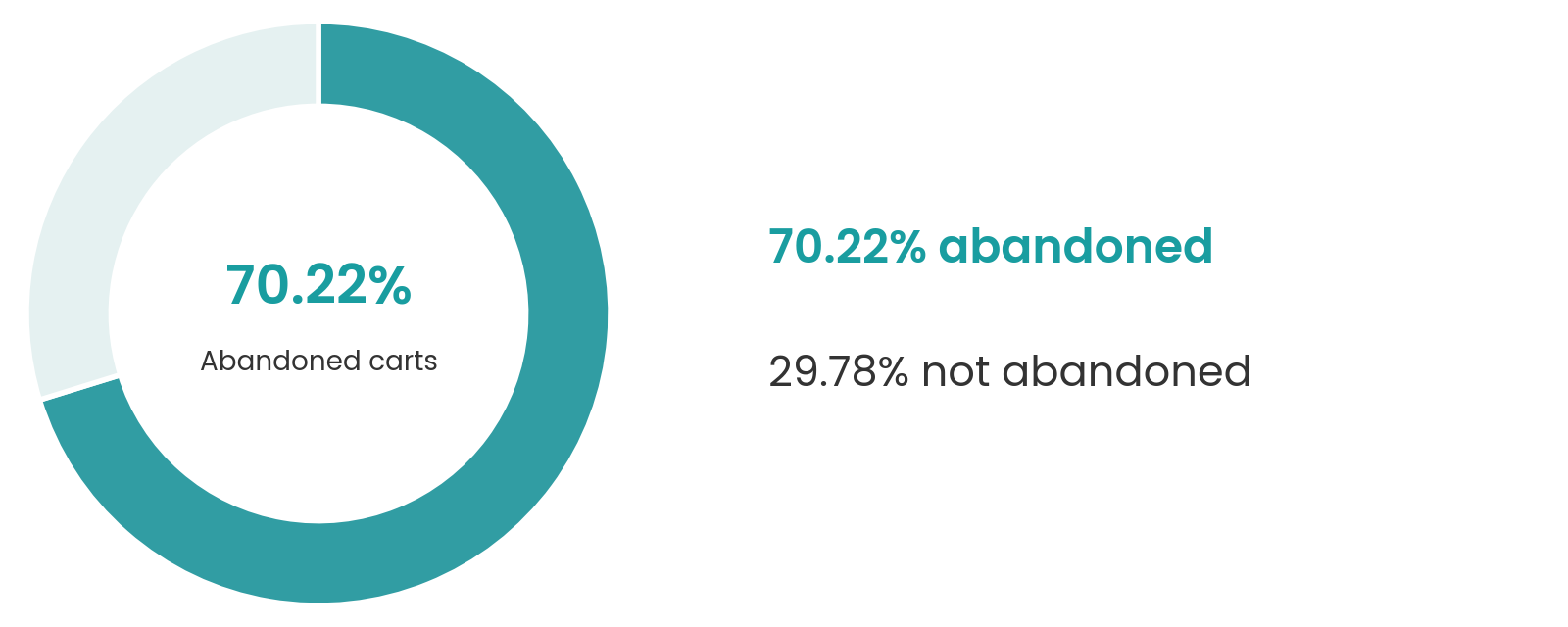
The opportunity is enormous. According to Shopify’s 2025 financial results, merchants generated approximately $378.4 billion in gross merchandise volume through the platform during the year. Yet attracting customers doesn’t guarantee sales. Baymard Institute’s cart abandonment research reports an average online shopping cart abandonment rate of 70.22%, highlighting how frequently purchase journeys remain unfinished.
That’s where professional Shopify website development services become valuable.
A successful Shopify store needs more than attractive colors and product images. It requires fast-loading pages, intuitive navigation, mobile-friendly design, compelling product presentations, and a checkout experience that makes buying feel effortless.
Whether you’re launching your first online store or improving an existing one, investing in the right Shopify website development services can help turn more visitors into customers.
In this guide, we’ll explore development costs, essential features, customer behavior, conversion statistics, common mistakes, and how to choose a Shopify developer or agency that can support your business growth.
1. What Are Shopify Website Development Services?
Shopify website development services involve designing, building, customizing, and optimizing online stores using the Shopify platform.
While Shopify provides ready-made themes and built-in selling tools, building a successful store requires more than choosing a template and uploading products. Professional developers focus on website functionality, user experience, mobile responsiveness, payment integration, search engine optimization, and conversion-focused design.
Shopify Website Design vs. Development
Although closely connected, website design and development serve different purposes.
Shopify website design services focus on the visual appearance and usability of an online store, including layouts, branding, product presentation, navigation, and customer experience.
Development focuses on the technical side, ensuring that website features, payment systems, third-party applications, and other functionalities work correctly.
Custom Shopify Development vs. Ready-Made Themes
Ready-made Shopify themes offer an affordable starting point for businesses with straightforward requirements.
Custom Shopify website development allows businesses to create tailored storefronts with unique layouts, specialized features, and integrations that support their operations.
Who Needs Professional Shopify Development?
Professional Shopify development can benefit startups launching their first stores, established retailers moving online, and growing brands looking to improve their existing websites.
Whether you’re selling clothing, electronics, beauty products, or subscription-based goods, professional Shopify store development services can help create a reliable shopping platform that meets customer expectations and supports business growth.
2. Shopify and E-Commerce Industry Statistics: What the Numbers Reveal
The eCommerce industry continues to expand, creating enormous opportunities for businesses selling online. However, as more brands enter the market, competition for customer attention and sales becomes increasingly challenging.
Shopify's Growth and Market Presence
Shopify has established itself as one of the world’s leading eCommerce platforms, supporting businesses across numerous countries.
According to Shopify’s 2025 financial results:
- $378.4 billion in gross merchandise volume (GMV) was facilitated through Shopify in 2025.
- Merchant GMV increased approximately 29% compared with 2024.
- Shopify’s annual revenue reached approximately $11.6 billion, representing 30% growth.
Shopify also reported 34% year-over-year revenue growth in the second quarter of 2026, demonstrating continued platform expansion, as noted in its August 2026 financial release.
US E-Commerce Market Growth
Online shopping continues to represent an increasingly important share of American retail spending.
According to the US Census Bureau’s August 2026 report:
- US retail eCommerce sales reached approximately $340.2 billion in Q2 2026, seasonally adjusted.
- Online sales represented 17.1% of total US retail sales on the same basis.
- E-commerce sales increased 12.2% year over year, compared with 6.7% growth in total retail sales.
Mobile Shopping Is Changing Customer Expectations
Mobile commerce is now central to how Americans shop.
According to Adobe Analytics’ January 2026 report, US consumers spent $257.8 billion online during November and December 2025, an increase of 6.8% compared with the previous holiday season.
More importantly, 56.4% of online transactions during that period occurred on smartphones, compared with 54.5% in 2024.
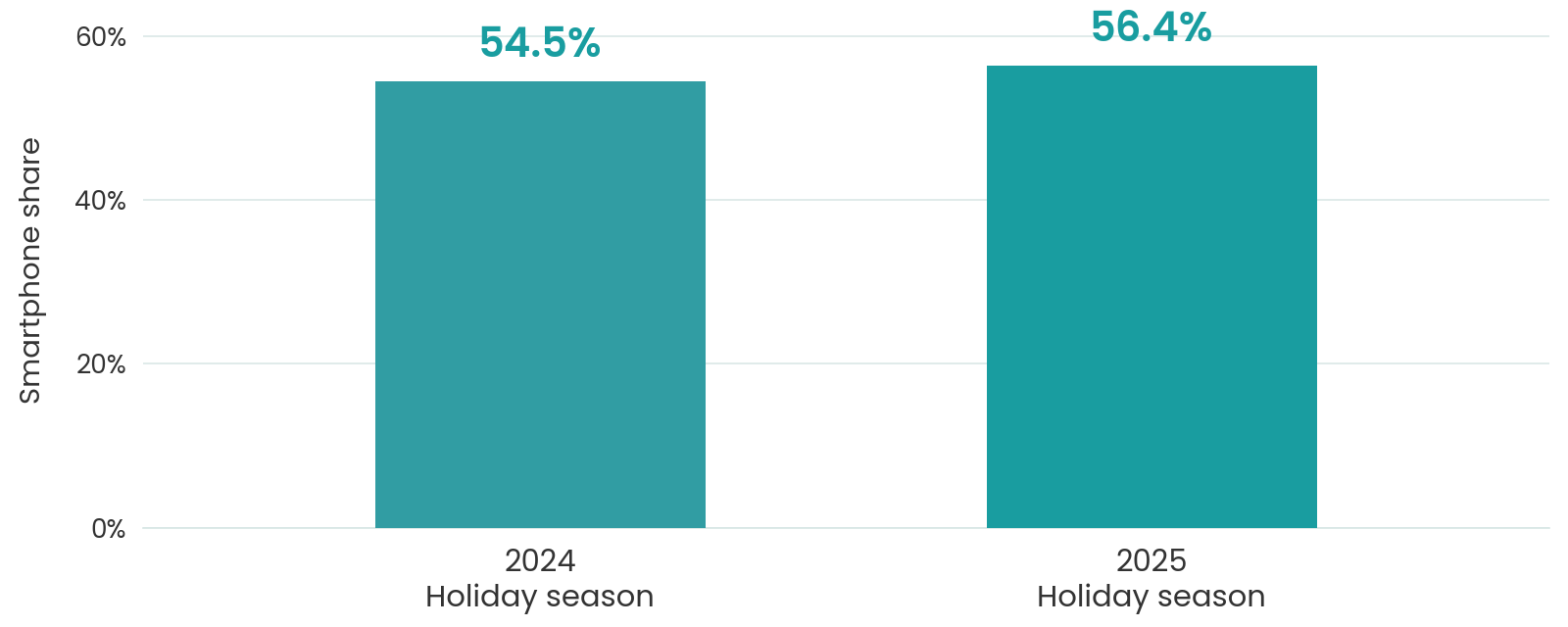
This makes mobile optimization a business priority rather than an optional feature. Professional Shopify eCommerce development services can help businesses respond to these trends through responsive layouts, streamlined navigation, faster product browsing, and mobile-friendly checkout experiences.
The lesson is clear: as online shopping grows, businesses need websites designed not simply to attract traffic, but to turn that traffic into meaningful sales.
3. How Customers Interact With Websites and Why User Experience Matters
Have you ever visited an online store, struggled to find a product, and left within seconds? Your potential customers behave the same way. They expect websites to be fast, easy to navigate, visually appealing, and trustworthy.
Understanding how people interact with online stores is essential because even small usability problems can turn interested shoppers into lost sales.
First Impressions Influence Customer Decisions
Visitors form opinions about websites remarkably quickly.
Research published by the Nielsen Norman Group found that the first 10 seconds of a website visit are particularly important in determining whether users stay or leave. This is older research, but it remains a useful design principle rather than a prediction for every visitor.
Professional Shopify website design services help businesses create clear layouts, consistent branding, and intuitive shopping experiences that encourage visitors to explore further.
How Online Shoppers Browse and Compare Products
Most customers don’t purchase the first product they see. They compare prices, read reviews, examine product images, check delivery options, and evaluate alternatives before making a decision.
As usability expert Jakob Nielsen famously explained:
“Users spend most of their time on other sites.”
— Jakob Nielsen, Co-founder of Nielsen Norman Group, Jakob’s Law of Internet User Experience.
This principle suggests that customers expect familiar shopping features, including recognizable cart icons, accessible search bars, clear product categories, and straightforward checkout processes.
Website Design Directly Influences Customer Trust
Customers are understandably cautious when sharing personal information and payment details with unfamiliar online stores.
According to Baymard Institute’s 2026 shopper research, 19% of surveyed US online shoppers who gave reasons beyond simply browsing reported abandoning checkout because they didn’t trust the website with their credit card information.
Mobile Responsiveness and Website Speed Matter
A website that looks excellent on a desktop might still frustrate mobile shoppers if buttons are difficult to tap, images load slowly, or text requires constant zooming.
In Google’s widely cited 2017 mobile speed research, increasing page load time from one to three seconds was associated with a 32% increase in the probability of a visitor bouncing. This is a historical benchmark, not a guaranteed effect for every Shopify store.
Professional Shopify website development services prioritize responsive layouts, optimized images, accessible navigation, and smooth mobile shopping experiences.
4. How a Professionally Designed Shopify Website Generates More Sales
Imagine two online stores selling identical products at similar prices. One has cluttered pages, blurry images, and a complicated checkout. The other offers attractive product displays, clear information, fast loading, and an effortless buying experience. Which store would you trust with your money?
That’s why investing in professional Shopify website development services isn’t simply about making your website look attractive. It’s about creating a shopping experience that encourages visitors to become paying customers.
1. Turn Website Visitors Into Paying Customers
Getting traffic through Google, social media, or paid advertising is only the beginning. Your website must guide visitors toward making a purchase.
Effective Shopify website design services use intuitive navigation, well-organized product categories, and strategically placed calls to action (CTAs). For example, a clearly visible “Add to Cart” button, detailed product information, and transparent shipping costs can remove hesitation and make purchasing easier.
2. Build Customer Trust Through Professional Design
Customers are more comfortable purchasing from websites that appear credible and professional. Consistent branding, high-quality images, authentic reviews, clear return policies, and accessible customer support information help establish that trust.
As Apple’s co-founder Steve Jobs famously explained in a 2003 interview with The New York Times Magazine:
“It’s not just what it looks like and feels like. Design is how it works.”
— Steve Jobs, quoted in The Guts of a New Machine (November 30, 2003).
3. Create Product Pages That Encourage Purchases
Effective product pages include clear descriptions, multiple product images, accurate specifications, customer reviews, and visible delivery information.
Through custom Shopify website development, businesses can create product layouts tailored to their audience, whether they sell fashion, electronics, furniture, or personalized products.
4. Reduce Checkout Friction and Recover Potential Sales
A complicated checkout can discourage customers who are already interested in buying.
According to Baymard Institute’s checkout usability research, the average large eCommerce website could potentially achieve around a 35% improvement in conversion rate by addressing checkout usability issues. This is an estimated opportunity across studied sites, not a guaranteed outcome for any particular business.
Simplified forms, guest checkout, transparent pricing, and suitable payment options can make completing an order easier.
5. Increase Average Order Value Through Smarter Shopping Experiences
A well-designed Shopify store can also encourage customers to purchase additional products through relevant recommendations, product bundles, and complementary items.
For example, a customer buying running shoes might also be interested in sports socks or shoe-care products.
Combining thoughtful product recommendations with professional eCommerce website development services can help businesses create more effective shopping experiences.
Ultimately, Shopify website development services should focus on measurable business outcomes: better usability, stronger customer confidence, improved conversion opportunities, and sustainable sales growth.
5. Essential Features and Services Every Successful Shopify Store Needs
Building a successful online store requires more than adding products and choosing an attractive theme. Customers expect smooth navigation, fast-loading pages, secure payments, and a shopping experience that works effortlessly across devices.
Professional Shopify website development services combine technical functionality with customer-focused design to create stores that are easier to manage, navigate, and shop from. Here are seven essential features every Shopify store should consider.
1. Custom Shopify Theme Design and Development
Your website’s appearance plays an important role in how customers perceive your business.
Custom Shopify website development allows businesses to personalize their storefronts with unique layouts, branded product pages, interactive features, and tailored shopping experiences.
2. Mobile-Friendly and Responsive Website Design
With smartphones accounting for a substantial share of online shopping activity, mobile responsiveness is essential.
Professional Shopify website design services ensure that product images, menus, buttons, and checkout features display correctly across smartphones, tablets, and desktop computers.
A mobile-friendly Shopify store should feature readable text, easily accessible navigation, appropriately sized buttons, and a simple checkout process.
3. Organized Product Catalog and Easy Navigation
Imagine visiting an online clothing store with hundreds of products but no clear categories or filters. Finding the right item would quickly become frustrating.
Effective Shopify store development services focus on organizing products into meaningful collections and creating intuitive navigation. Useful features include product search, category filters, sorting options, detailed product descriptions, and related-product recommendations.
4. Secure Payment Gateways and Optimized Checkout
Customers need confidence that their personal information and payments are handled securely. Shopify provides hosted checkout infrastructure and supports various payment methods, including Shopify Payments and eligible third-party providers.
Developers should configure supported payment options, test transactions, display shipping charges clearly, and ensure customers can complete purchases without unnecessary complications. Payment availability and checkout customization capabilities can vary by country, provider, and Shopify plan.
5. SEO-Friendly Website Structure
Even an attractive online store cannot generate consistent organic traffic if customers struggle to find it through search engines.
An SEO-friendly Shopify website should include descriptive product URLs, optimized page titles, compelling meta descriptions, structured headings, and useful product content.
Shopify automatically provides certain technical SEO features, including XML sitemaps and canonical tags.
6. Third-Party App Integrations and Automation
Growing businesses often need additional functionality beyond Shopify’s built-in tools.
Professional Shopify eCommerce development services can integrate email marketing platforms, inventory management systems, customer support tools, analytics software, and shipping solutions.
For example, connecting an email marketing platform can help businesses follow up with customers who abandon checkout, provided appropriate consent and privacy requirements are met.
7. Website Speed, Security, and Scalability
Slow-loading websites can frustrate potential customers and discourage purchases.
According to Shopify’s official performance guidance, storefront themes, installed apps, and third-party scripts are among the biggest factors affecting website performance.
Businesses should regularly evaluate these elements, optimize images, remove unnecessary applications, and monitor loading speed. Shopify also provides hosting infrastructure, SSL certificates, and built-in performance features, allowing developers to concentrate on storefront optimization and business-specific requirements.
Ultimately, successful Shopify website development services should deliver a website that not only looks professional but also performs reliably, supports future growth, and makes purchasing easier for customers.
6. Shopify Conversion Rates: Why Visitors Leave Without Purchasing
Imagine 1,000 people visiting your online store, but only 14 complete a purchase. What happens to the other 986 shopping sessions?
This is one of the biggest challenges eCommerce businesses face. Attracting traffic is important, but converting that traffic into paying customers determines whether your marketing efforts generate meaningful revenue.
What Is the Average Shopify Conversion Rate?
An eCommerce conversion rate measures the percentage of website sessions that result in a completed purchase.
According to Littledata’s October 2026 Shopify benchmark, based on 436 Shopify stores:
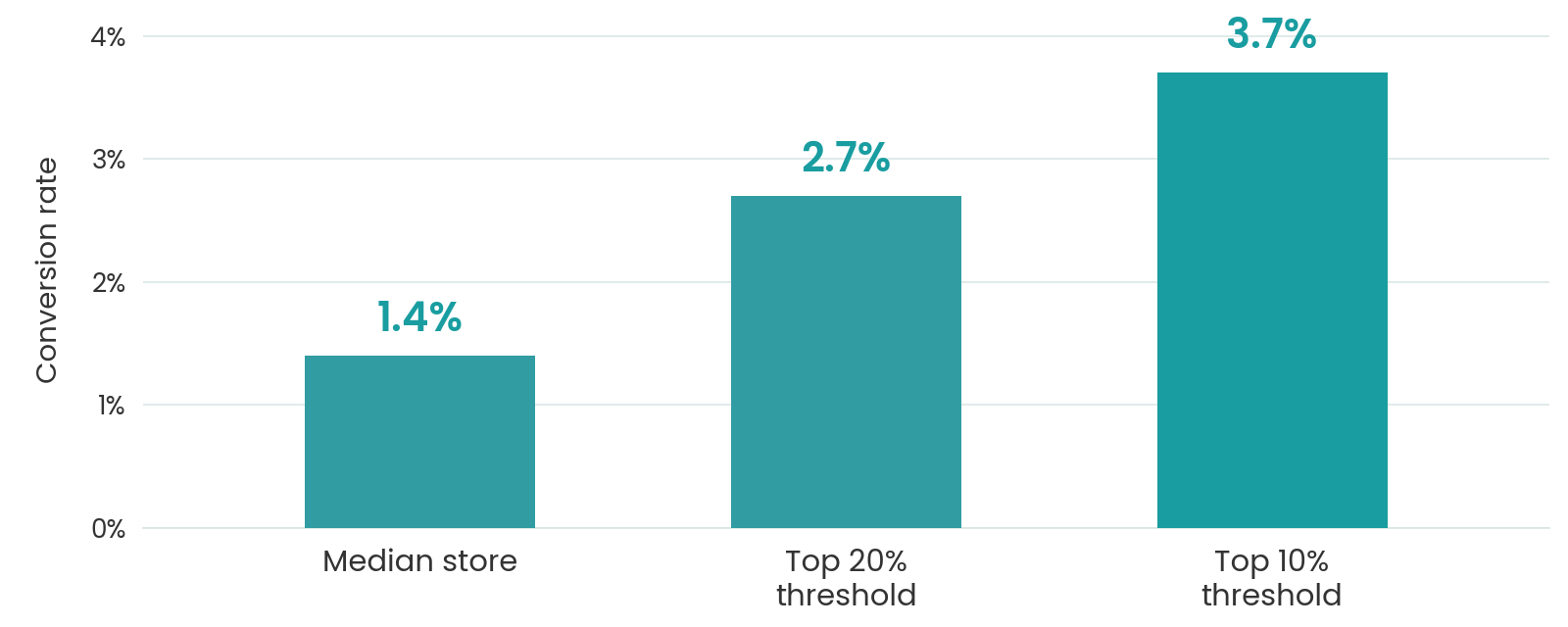
At the median conversion rate, approximately 98.6% of website sessions don’t result in a purchase. Importantly, sessions are not identical to individual visitors, and shoppers may make multiple visits before ordering.
Conversion rates vary significantly depending on product categories, pricing, traffic quality, and customer buying behavior.
Shopping Cart Abandonment: How Many Customers Leave?
Cart abandonment occurs when shoppers add products to their carts but leave without completing checkout.
According to Baymard Institute’s cart abandonment research, the average documented cart abandonment rate is 70.22%, calculated from 50 studies. This means roughly seven out of ten shopping carts are abandoned before purchase.
Baymard’s 2026 research also identifies common reasons shoppers abandon orders, excluding those who were simply browsing:
Reason for abandonment | Shoppers reporting it |
|---|---|
Unexpected or excessive additional costs | 40% |
Delivery was too slow | 20% |
Lack of trust in payment security | 19% |
Required account creation | 18% |
Complicated checkout process | 17% |
These percentages represent survey responses, not the proportion of all website visitors who abandoned purchases.
How to Reduce Cart Abandonment and Improve Sales
Businesses can address many of these problems through practical website improvements.
Display costs early. Show shipping fees, taxes, and estimated delivery dates before customers reach the final checkout stage.
Simplify the buying process. Offer guest checkout, minimize unnecessary form fields, and support convenient payment methods.
Build customer confidence. Include genuine reviews, transparent return policies, accurate contact information, and secure payment options.
Optimize mobile shopping. Ensure that customers can browse products, enter information, and complete purchases comfortably on smartphones.
Recover abandoned checkouts. Use permission-based email reminders and relevant follow-up offers to encourage interested shoppers to return.
Professional Shopify website development services can help businesses identify technical obstacles, improve checkout usability, and create smoother purchasing experiences.
Even a small increase in conversion rate can generate additional revenue without requiring more advertising traffic. That’s why effective Shopify store development services should prioritize customer experience and measurable sales performance rather than appearance alone.
7. Common Shopify Website Development Mistakes and How to Fix Them
Launching a Shopify store might seem straightforward, but small development mistakes can seriously affect website performance, customer experience, and sales.
1. Choosing the Wrong Shopify Theme
The mistake: Selecting a theme based entirely on its appearance without considering loading speed, product requirements, or customization options.
The solution: Choose a responsive, performance-optimized theme that supports your product catalog and business objectives. Consider custom Shopify website development when your store requires specialized functionality that standard themes cannot adequately provide.
2. Ignoring Mobile Responsiveness
The mistake: Designing primarily for desktop users while overlooking how customers browse and purchase products on smartphones.
The solution: Test your website across multiple screen sizes. Professional Shopify website design services can help create mobile-first layouts with accessible menus, readable text, and easy-to-use checkout features.
3. Allowing Website Pages to Load Slowly
The mistake: Uploading oversized product images, using excessive animations, or adding unnecessary scripts.
The solution: Optimize images, use an efficient theme, minimize unnecessary scripts, and monitor performance through Google PageSpeed Insights and Shopify’s Web Performance reports.
According to Shopify’s performance recommendations, themes, installed apps, and third-party code are key areas businesses should evaluate when improving storefront speed.
4. Creating Confusing Website Navigation
The mistake: Using unclear product categories, complicated menus, or poorly organized collections. Customers who struggle to find products may abandon the website before discovering what they need.
The solution: Create logical product categories, implement useful search filters, and ensure popular products are easy to access.
5. Making Checkout Unnecessarily Complicated
The mistake: Requiring customers to create accounts, hiding shipping costs, or asking for unnecessary information during checkout.
The solution: Enable suitable accelerated payment methods and guest checkout options, display shipping information clearly, and minimize avoidable purchasing steps.
6. Installing Too Many Shopify Apps
The mistake: Adding multiple applications with overlapping functions without evaluating their performance impact or ongoing subscription costs.
The solution: Audit your installed apps regularly. Remove unnecessary applications and evaluate whether essential functionality can be achieved through Shopify’s built-in tools. Experienced providers of Shopify eCommerce development services can help businesses select compatible integrations without creating unnecessary technical complexity.
7. Neglecting Search Engine Optimization
The mistake: Publishing product pages with duplicate descriptions, unclear headings, missing metadata, or poorly structured URLs.
The solution: Write unique product descriptions, optimize title tags, organize headings, improve internal linking, and track organic performance using Google Search Console.
8. Launching Without Proper Website Testing
The mistake: Making a website publicly available without checking whether payments, shipping calculations, product variants, and order notifications work correctly.
The solution: Perform complete pre-launch testing across devices and browsers. Place test orders, check successful and failed payment scenarios, verify shipping and taxes, and confirm that customers receive appropriate order notifications.
Shopify’s official launch checklist recommends testing the checkout and order-processing experience before launching.
Ultimately, avoiding these mistakes is just as important as choosing attractive website designs. Professional Shopify website development services can help businesses identify technical weaknesses, improve the customer journey, and create online stores built for reliable long-term performance.
8. Step-by-Step Shopify Website Development Process
Building a successful Shopify store requires careful planning, thoughtful design, and proper technical implementation. Whether you’re launching a new eCommerce business or upgrading an existing store, following a structured development process can help you avoid costly mistakes.
Professional Shopify website development services typically follow six essential steps.
Step 1: Define Your Business Goals and Target Audience
Start by identifying what you want your online store to achieve. Are you launching a new brand, increasing direct-to-consumer sales, or expanding into new markets?
Research your target audience, competitors, product demand, and customer preferences.
Step 2: Choose the Right Shopify Plan and Theme
Select a Shopify subscription that matches your budget, expected sales volume, and required features. Next, choose a responsive theme that complements your brand. Businesses with specialized requirements may benefit from custom Shopify website development rather than relying entirely on pre-built templates.
Step 3: Design Your Storefront and User Experience
Create attractive, easy-to-navigate layouts for your homepage, product collections, product pages, and shopping cart. Focus on consistent branding, intuitive navigation, readable content, and clearly visible purchase buttons.
Step 4: Add Products and Configure Essential Features
Upload high-quality product images, write informative descriptions, organize collections, and configure pricing and inventory. Professional Shopify store development services can also help integrate shipping providers, payment gateways, analytics tools, and customer support applications.
Step 5: Test Website Functionality and Performance
Before launching, test your website across different devices and browsers. Verify product variants, checkout functionality, shipping calculations, payment processing, and order notifications.
According to Shopify’s official testing guidance, businesses should place at least one test order to confirm their checkout and order-processing settings work correctly.
Step 6: Launch, Monitor, and Optimize
Once testing is complete, connect your domain, review store policies, and publish your website. After launch, monitor website traffic, customer behavior, conversion rates, and technical performance.
Investing in professional Shopify website development services can make this process more efficient while helping you build an online store that supports long-term growth.
9. How Much Do Shopify Website Development Services Cost?
One of the first questions business owners ask before launching an online store is, “How much will it cost?”
Shopify Subscription Pricing
Shopify offers different subscription plans based on business requirements. According to Shopify’s official US pricing page, the standard plans are:
Shopify plan | Monthly cost (billed yearly) |
|---|---|
Basic | $29/month |
Grow | $79/month |
Advanced | $299/month |
Shopify Plus | From $2,300/month |
These prices represent platform subscription fees, not website development costs. Monthly billing, where available, generally costs more, and Shopify Plus pricing depends on contract terms.
Template-Based vs. Custom Shopify Development Costs
A template-based Shopify store is generally more affordable because developers customize an existing theme rather than building everything from scratch.
According to Upwork’s Shopify developer pricing guide, indicative project costs include:
- Theme customization: $500–$2,000.
- Custom Shopify theme development: $3,000–$10,000.
These are marketplace estimates, not fixed prices. Complex integrations, migrations, and advanced functionality may require significantly larger budgets.
Businesses seeking Shopify eCommerce development services should request detailed proposals that explain exactly what each price includes.
Additional Costs to Consider
Beyond initial development, businesses should budget for domain registration, premium themes, paid applications, transaction fees, and ongoing website maintenance.
Is Professional Shopify Development Worth the Investment?
The cheapest development option doesn’t always provide the best long-term value. A poorly designed website may require expensive corrections or create purchasing difficulties that reduce sales opportunities.
Instead of comparing prices alone, evaluate the developer’s experience, deliverables, post-launch support, and ability to create a conversion-focused shopping experience. The right investment should balance development costs with usability, business requirements, and opportunities for sustainable revenue growth.
10. How to Find and Hire the Right Shopify Website Developer or Agency
Choosing the right developer can make the difference between launching a store that simply looks attractive and building an online business that consistently generates sales. With countless freelancers and development agencies offering similar services, knowing whom to trust isn’t always easy.
1. Freelancer vs. Shopify Development Agency: Which Is Better?
Freelancers are often suitable for smaller projects, theme adjustments, and straightforward store setups. They may offer competitive rates and direct communication.
Agencies, on the other hand, typically provide access to multiple specialists, including designers, developers, SEO professionals, and project managers.
For businesses requiring comprehensive Shopify store development services, an experienced agency may offer better coordination across design, development, integrations, and testing. However, the best choice depends on your budget, project complexity, and required support.
2. Evaluate Technical Skills and Shopify Experience
Before hiring a developer, evaluate their experience with Shopify Liquid, HTML, CSS, JavaScript, theme customization, app integrations, and performance optimization.
If your business requires specialized functionality, look for professionals experienced in Shopify eCommerce development services and complex integrations.
3. Review Portfolios and Previous Projects
A strong portfolio provides insight into a developer’s capabilities. Examine previously completed websites and evaluate their design quality, navigation, mobile responsiveness, and overall shopping experience.
Don’t rely exclusively on screenshots. Visit live websites whenever possible.
You can also explore ZH Consultancy’s Shopify development offerings to understand the types of store design, development, and launch support available when comparing service providers.
4. Ask Important Questions Before Hiring
Before signing a contract, ask potential developers:
- Have you developed Shopify stores for businesses in my industry?
- Can you show examples of completed projects?
- What features and integrations are included in the quoted price?
- How will you optimize website speed and mobile usability?
- Will I receive full ownership and administrative access?
- What happens if technical problems arise after launch?
5. Watch for Common Hiring Red Flags
Be cautious of developers who promise guaranteed sales, refuse to share relevant work samples, provide vague pricing, or avoid discussing project timelines.
Another warning sign is requesting your personal Shopify login credentials. Shopify recommends using collaborator accounts, which allow authorized professionals to access only the store areas they need.
6. Compare Proposals and Confirm Post-Launch Support
A professional development proposal should clearly explain project deliverables, pricing, milestones, revision policies, and expected completion dates.
Confirm who owns custom code, design assets, and other deliverables after payment. Ask whether training, documentation, maintenance, and technical support are included.
Ultimately, selecting the right provider of Shopify website development services means finding a reliable partner who understands your business objectives, communicates clearly, and can develop a store designed for long-term growth.
11. How to Improve Shopify Store Performance After Launch
Launching your Shopify store is an important milestone, but the real work doesn’t end there. Customer expectations, shopping behaviors, and market trends continuously evolve.
1. Track Website Traffic and Customer Behavior
Use Shopify Analytics and Google Analytics 4 to understand how visitors interact with your online store.
Monitor important metrics such as conversion rate, average order value, traffic sources, and cart abandonment. According to Shopify’s official analytics documentation, merchants can analyze visitor activity, website performance, and transactions to identify opportunities for improvement.
2. Use A/B Testing to Improve Conversions
Test different product images, headlines, page layouts, and calls to action to discover which versions encourage more purchases.
3. Improve SEO and Organic Website Traffic
Regularly update product descriptions, optimize category pages, and publish helpful content targeting relevant search queries. Use Google Search Console to monitor search impressions, clicks, and keyword performance.
4. Reduce Shopping Cart Abandonment
Review where customers leave the buying process. Improve checkout clarity, provide transparent shipping information, and offer convenient payment options. Consider automated abandoned checkout emails to reconnect with interested customers who have agreed to receive relevant communications.
5. Maintain Website Speed and Functionality
Regularly review installed applications, monitor loading performance, and test important shopping features. Professional website maintenance services can help businesses manage technical issues, performance checks, and ongoing store improvements.
Ultimately, Shopify website development services should support continuous optimization rather than end at launch. A consistently maintained store provides a stronger foundation for customer satisfaction, repeat purchases, and sustainable eCommerce growth.
12. Conclusion: Build a Shopify Store That Turns Visitors Into Customers
A successful online store is more than a digital storefront. It’s a powerful business tool that connects your products with customers, builds trust, and creates opportunities for consistent sales.
From responsive design and intuitive navigation to secure checkout and search engine optimization, every element of your website influences the shopping experience.
Investing in professional Shopify website development services can help you create a store that looks credible, functions reliably, and supports your long-term business goals.
Whether you’re launching a new business or upgrading an existing store, focus on usability, performance, and your customers’ needs.
Your goal shouldn’t simply be to attract more visitors. It should be to turn the right visitors into satisfied, returning customers.
Build an online store that doesn’t just look professional—it works for your business.
Faq
Frequently Asked Questions
Yes. Shopify is suitable for small businesses because it provides hosting, inventory management, payment integrations, and customizable storefront themes in one platform.
A basic Shopify store may take one to three weeks to develop, while more complex projects can take four to eight weeks or longer. Development timelines depend on design requirements, product quantities, custom features, integrations, and client feedback.
Not necessarily. Shopify provides customizable themes and a visual editor that allows beginners to build stores without coding. However, hiring an experienced developer can be valuable when you need advanced functionality, specialized integrations, or a unique customer experience.
Yes, professional design can improve sales opportunities by simplifying navigation, building customer trust, and reducing purchasing obstacles. However, results also depend on product quality, pricing, website traffic, and marketing effectiveness.
Custom development can be worthwhile for businesses requiring unique designs, advanced product configurations, or specialized functionality. For smaller businesses, a well-optimized premium theme may provide better initial value than extensive customization.
Look for a company with relevant experience, a strong portfolio, transparent pricing, and reliable client feedback.
Before investing in Shopify website development services, discuss project deliverables, development timelines, website ownership, technical support, and maintenance requirements. Choose a partner who understands your business objectives rather than focusing exclusively on visual design.

Zain Hameed
Business strategy specialist helping a global client base of 800+ businesses build credible plans, financial models and investor-ready presentations.
In this article
Book a Free Consultation
Have a business idea, growth challenge or investor deadline? Book a free consultation and get clear next steps from our team.
Call our team
+923104049517
Email us

Business Topics
Business topics
Continue reading
Related insights

How to Start a Dumpster Rental Business: From First Container to Profitable Fleet
Learn how to start a dumpster rental business, estimate startup costs,

How to Start a Bounce House Business: From Weekend Rentals to a Profitable Company
Learn how to start a bounce house business, estimate startup costs,

How to Start an Interior Design Business: From Creative Talent to Profitable Studio
Learn how to start an interior design business, understand qualifications, estimate

How to Start an Electrical Business: From Skilled Electrician to Profitable Contractor
Learn how to start an electrical business, understand licensing, estimate startup

How to Start a Window Cleaning Business: From First Job to Profitable Company
Learn how to start a window cleaning business, estimate startup costs,

How to Start a Security Business: From First Contract to Profitable Company
Learn how to start a security business, understand licenses, calculate guard