

In this article
An online customer finds your business on Google, likes what you offer, and clicks the contact button. The form looks perfectly normal. They type their details, hit Send, and get a cheerful confirmation message.
There is just one problem.
The email never reaches you.
You discover the problem three weeks later, after wondering why inquiries have suddenly dried up. Your website looked fine. Your marketing was working. But somewhere between an update and a forgotten integration, the most important button on the page stopped doing its job.
That is the kind of problem a competent web maintenance agency is supposed to prevent, spot, or resolve quickly. Not by promising your website will never break—no credible provider can promise that—but by giving updates, backups, testing, security and recovery actual owners.
For US business owners, the challenge is choosing help that fits the website they have. A five-page plumbing website doesn’t need the same support arrangement as a busy WooCommerce store. An agency that sells the same package to both without asking questions should make you nervous.
1. What Does a Web Maintenance Agency Actually Do?
A web maintenance agency keeps an existing website operational, up to date, reasonably secure, and usable after launch. It may also help make small improvements, troubleshoot errors, and coordinate with your hosting or platform provider when something goes wrong.
Professional website maintenance services usually combine scheduled tasks with reactive support. Scheduled tasks include monitoring, software review, backups and health checks. Reactive work begins when an alert, a customer complaint or a staff request reveals something needing attention.
Maintenance is not the same as hosting
Your hosting company provides the infrastructure where the site runs. A maintenance provider looks after agreed parts of the website and its operation. Some companies bundle both; others work alongside your existing host. The split matters because one provider may monitor server uptime without knowing that your booking form is silently failing.
Likewise, a website developer builds or changes functionality. A maintenance provider may make small development fixes, but a complete redesign, custom application, or major migration is usually a separately scoped project. At ZH Consultancy’s website maintenance services, for example, the published approach distinguishes routine upkeep, monitoring, practical fixes and defined support allowances rather than treating every request as unlimited work.
What are you actually buying?
Think of a web maintenance agency as the person responsible for noticing when the doors are unlocked, the lights are flickering and the checkout counter isn’t working. The agency still needs a written agreement explaining which doors, which lights and how quickly it will respond.
A good proposal should identify the platforms covered, maintenance frequency, testing scope, backup location, report cadence, support hours, incident escalation, and chargeable exclusions. If all it promises is “we keep your site secure and fast,” you haven’t received a scope. You’ve received a slogan.
2. Why Ongoing Website Maintenance Matters for US Businesses
The hidden cost of a “mostly working” website
Suppose your site produces 80 qualified inquiries a month, or about 2.7 per day. If your inquiry flow fails for ten days, roughly 27 inquiries could be exposed to that failure, assuming consistent demand. That is an illustration, not a claim about how much money every business loses. But it shows why testing the customer journey matters more than merely checking whether the homepage loads.
A suitable website maintenance plan should therefore be designed around the actions that matter to your business: contact forms, bookings, purchases, downloads, logins or donations. A traffic-heavy landing page may deserve daily checks. An archived information page probably does not.
Search visibility is part of the picture, not a magic promise
Technical problems can interfere with crawling, usability and measurement. Broken redirects, accidental `noindex` settings, severe slowdown and unreliable mobile interactions all deserve attention. Google recommends good Core Web Vitals and explains that page experience aligns with what its ranking systems seek to reward, but no agency can guarantee a particular Google ranking through maintenance alone. Google’s Core Web Vitals guidance provides the official thresholds.
That is the sensible reason to care about maintenance and SEO: you protect a functioning foundation. You still need useful content, a clear offering, and a real search strategy to compete.
3. Global Market Context: What the Research Really Says
You’ll see market reports describing the enormous IT services sector and implying that every website-support niche is growing at the same rate. Be careful. IT services includes consulting, outsourcing, infrastructure and hosting; dedicated website maintenance is a much narrower business category.
Statista’s US IT Services market outlook covers consulting, implementation, outsourcing and other IT services, and includes web hosting within its outsourcing definition. It offers useful context about external technology support, but it does not provide an independent revenue figure for the US web maintenance agency niche on its publicly available page. Claiming otherwise would stretch the data.
For website owners, two more directly useful datasets describe the environment their sites operate in: real-world web performance and WordPress software vulnerabilities. They show why preventive upkeep matters even when a site appears healthy.
Website speed is improving, but many sites still fall short
The HTTP Archive’s 2025 Web Almanac performance chapter, published in January 2026, found that 48% of mobile websites and 56% of desktop websites met the good Core Web Vitals standard in 2025. That means a substantial portion of measured websites did not achieve good scores across the complete set of metrics.
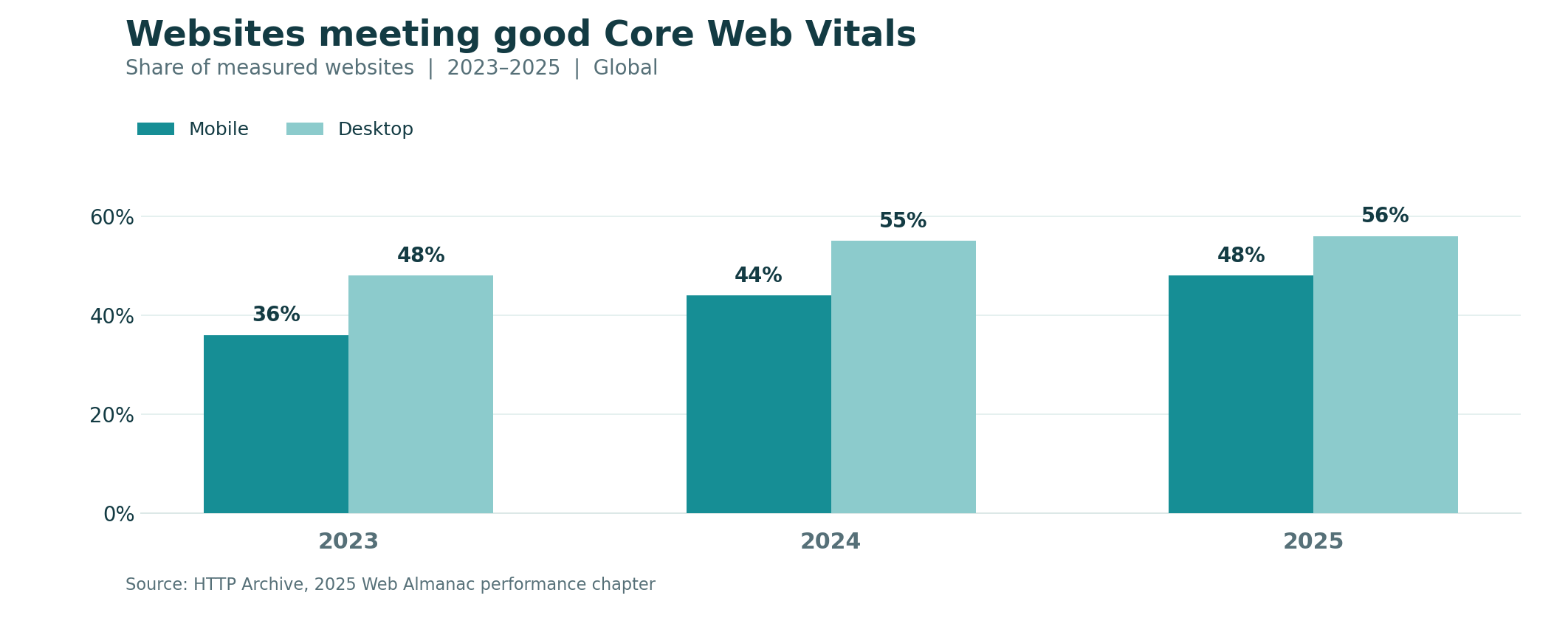
Figure 1. Share of websites with good overall Core Web Vitals, by device, 2023–2025. Percent of measured websites; rounded values. Global web performance benchmark, not a ranking guarantee or a measure of agency revenue.
Source: HTTP Archive, 2025 Web Almanac—Performance.
The trend is encouraging, but you shouldn’t assume your specific website is doing well because the wider web has improved. Check the pages that actually win customers, using field data in Search Console or PageSpeed Insights where available.
The WordPress security picture deserves attention
Patchstack’s State of WordPress Security in 2026 reports 11,334 newly identified vulnerabilities in the WordPress ecosystem during 2025, up from 7,966 in 2024. That is a 42% increase in reported findings, not a 42% increase in the likelihood that your individual site will be hacked. More research and disclosure can also affect the count.
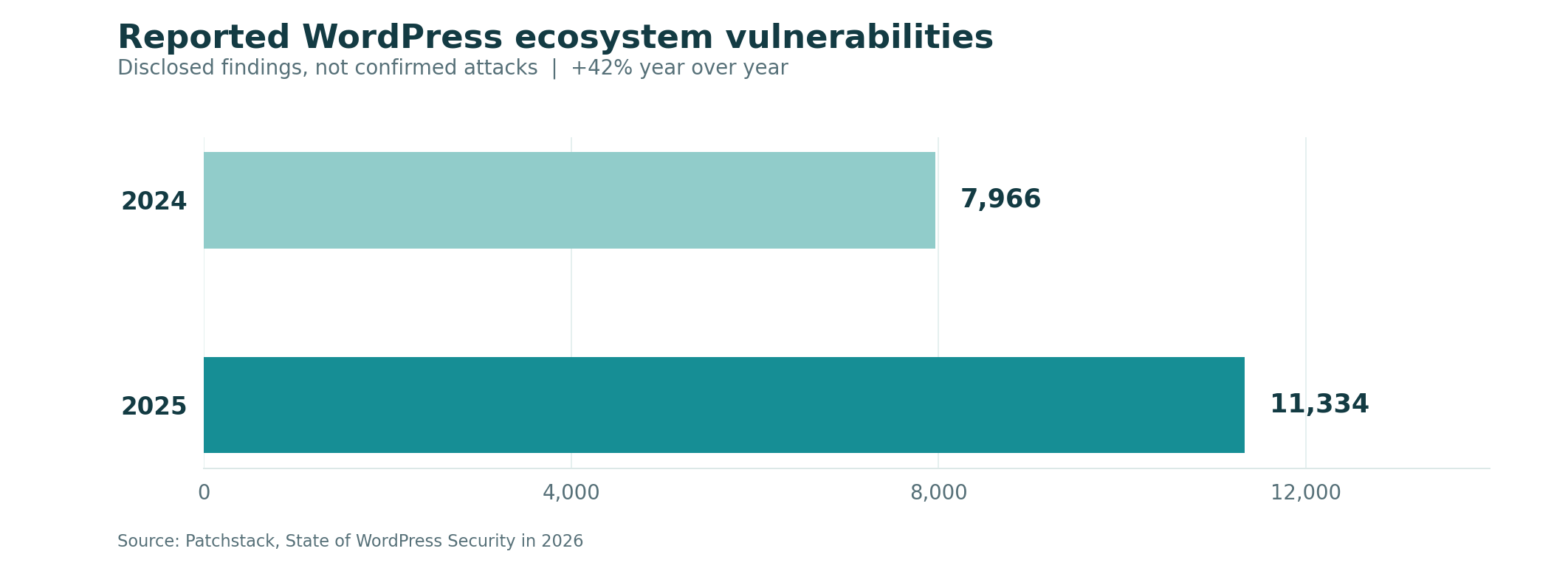
Figure 2. Newly reported WordPress ecosystem vulnerabilities: 7,966 in 2024 and 11,334 in 2025. Counts represent disclosed findings across the ecosystem, not incidents or compromised websites.
Source: Patchstack, State of WordPress Security in 2026.
Patchstack reports that 91% of 2025 findings were in plugins and 9% in themes, with six low-priority issues in WordPress core. That is a strong reason to assess the plugins and themes installed on your site, not simply press Update All and hope for the best.
A serious web maintenance agency uses this kind of evidence to shape a risk-based process: identify affected software, assess exposure, test patches, and prepare recovery options. Raw vulnerability counts alone cannot tell you whether an individual provider will do a good job.
4. Website Maintenance Services You Should Expect
Different websites need different levels of care. But most credible website maintenance services share a few foundations. The question is whether the provider explains what each one means in practice.
Software and integration updates
For WordPress, that means core, theme and plugin updates, with compatibility checks where necessary. For other platforms, it may mean checking connected apps, integrations, custom code and changing APIs. A reliable provider records what changed, uses staging for risky work when feasible, and tests key pages after the update.
Automatic updates can be useful, but automation is not a substitute for accountability. When a new version breaks a checkout, someone still needs to investigate and restore function.
Backups you can actually restore
A backup schedule should account for how often the site changes. A simple informational website might tolerate losing a day of edits. A busy store with orders coming in every hour has a much lower tolerance for data loss.
Ask about backup frequency, retention, off-site copies, encryption, and restore tests. The CISA 3-2-1 backup guidance recommends maintaining multiple copies on different media with an off-site copy. The principle matters; a successful test restore matters even more.
Website security monitoring should be connected to that backup and recovery process. Detection without a recovery plan simply tells you about the problem sooner.
Uptime, security and customer-journey monitoring
Uptime monitoring detects when a site or endpoint cannot be reached. It does not automatically confirm that forms, carts, booking flows or login pages behave correctly. Those require functional tests. A good web maintenance agency describes the difference instead of selling “24/7 monitoring” as a guarantee that every feature works.
The US Federal Trade Commission’s small-business cybersecurity guidance recommends multifactor authentication, software updates, limited access, regular backups and incident-response planning. Those are sensible practices for site administrators and contractors alike.
Performance, content and technical quality checks
Maintenance may include image compression, caching reviews, broken-link checks, certificate renewal monitoring, database housekeeping and minor content changes. It should also confirm that analytics and conversion tracking still record key actions after site changes.
5. How Much Does a Web Maintenance Agency Cost in the USA?
Here’s the question almost everyone asks first: “What should this cost per month?”
Reasonable question. But shopping only by monthly price is like comparing insurance policies by premium while ignoring what they cover.
The website maintenance cost depends on site complexity, support hours, response targets, platform, traffic, number of integrations and how much human work is included. Published US-market plans in 2026 range from inexpensive automated WordPress care to hundreds of dollars per month for higher-touch support, with larger custom arrangements priced separately. For a concrete reference, GoWP’s listed pricing and WP Buffs’ plans illustrate how service scope changes between tiers; check live quotes because pricing and inclusions can change.
Practical budgeting ranges—not universal market averages
Website and support level | Illustrative monthly budget (USD) | What to verify |
|---|---|---|
Small brochure site, light upkeep | $40–$125 | Update frequency, backups, alert handling |
Active service-business website | $125–$300 | Form tests, edits, incident response, reports |
Ecommerce or integration-heavy site | $300–$800+ | Checkout tests, backup frequency, response targets |
Custom application or high-risk operations | Individually quoted | Developer capacity, security scope, SLAs, recovery testing |
These are planning examples informed by published provider packages, not a Statista price survey or a quote from ZH Consultancy. Hosting, domains, paid plugins, emergency restoration and new development may cost extra.
For instance, a $95 monthly package that includes updates but charges $120 per hour for actual fixes may be more expensive than a $190 package with meaningful support time. The sticker price is only the beginning of the comparison.
A worked annual budget
Imagine a US service business choosing a $175 monthly support plan. That totals $2,100 a year. Add $360 for hosting, $120 for domain and related administration, and $240 in license renewals. Your illustrative annual operating budget becomes $2,820, or $235 a month on average.
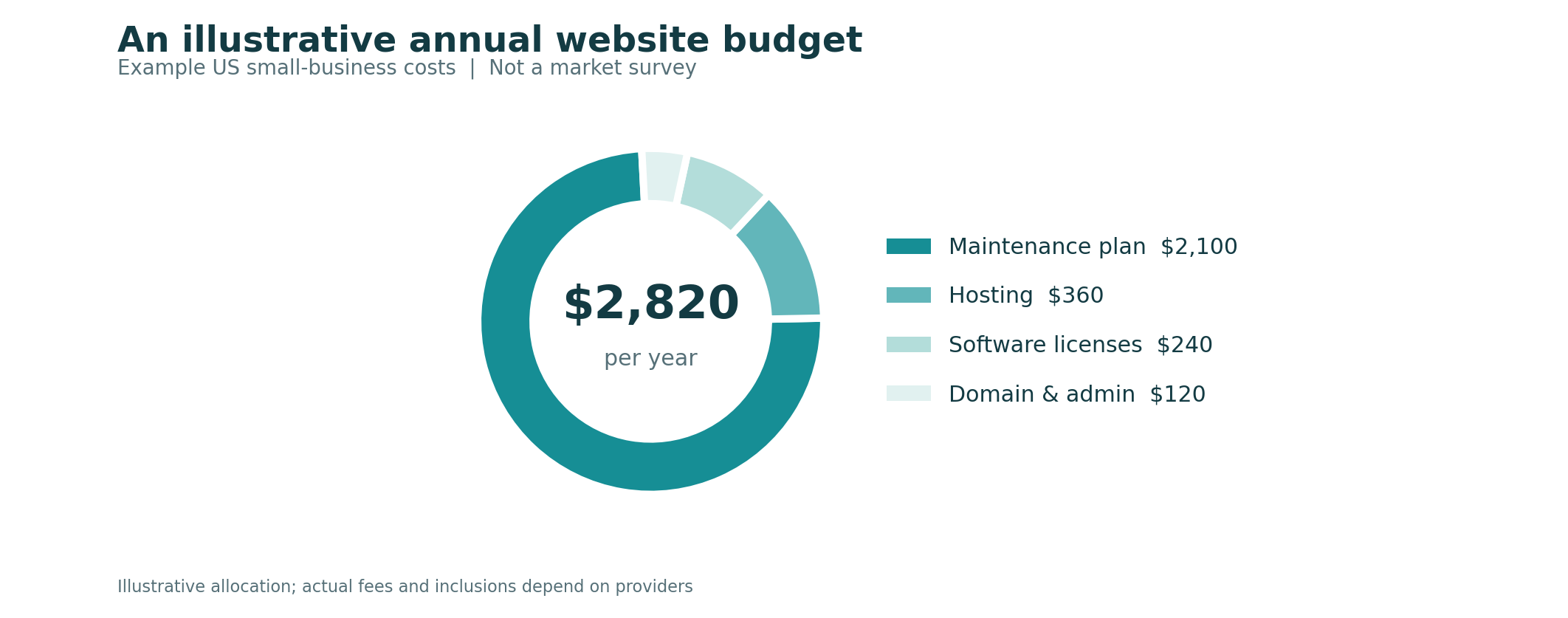
Figure 3. Illustrative annual operating budget for a small business website in USD: $2,100 support plan, $360 hosting, $240 licenses and $120 domain/administration; total $2,820. This is a planning scenario, not observed industry spending.
Source: Illustrative calculation based on the line items stated above; check live prices at GoWP and WP Buffs before budgeting.
The point isn’t that $2,820 is the correct budget for everyone. It’s that your website maintenance cost decision should consider all recurring dependencies and the cost of out-of-scope work.
Watch for these price traps
To compare website maintenance cost fairly, ask whether “unlimited edits” excludes design changes, whether malware cleanup is included, whether response times apply outside business hours, and whether monthly support minutes roll over. Confirm who pays for licenses and who owns the accounts. A transparent quote from a web maintenance agency should make it possible to calculate a realistic annual spend before you sign.
6. Choose the Right Website Maintenance Plan for Your Platform
A useful website maintenance plan follows the way your website works. Platform choice can change which technical tasks are even possible for an outside vendor.
WordPress and WooCommerce
WordPress websites involve a mixture of core software, plugins, themes, host settings and sometimes custom code. WordPress maintenance services should prioritize compatibility testing, vulnerability response, backups, form testing and account security. WooCommerce adds order flows, checkout, tax and shipping integrations, which deserve their own checks after material changes.
Shopify stores
Shopify operates the underlying hosted platform, so the agency typically doesn’t patch Shopify’s core infrastructure. Ongoing tasks may include theme updates, app audits, tracking checks, product merchandising, navigation fixes and checkout-related configuration reviews within the limits of the Shopify plan.
If the store needs a substantial rebuild rather than routine care, that is closer to Shopify website development services than a standard maintenance retainer. The distinction saves everyone from an argument about scope.
Custom-coded sites and web applications
A custom site may depend on libraries, servers, deployment pipelines, databases and external services that require specialist skills. An agency that works mainly with WordPress dashboards may not be the right fit for a React application with private APIs and strict release procedures.
In that situation, ask about code repositories, testing environments, access controls, staging and rollback plans. You might need ongoing custom website development alongside routine maintenance.
7. How to Compare a Web Maintenance Agency Before Hiring
Anyone can place “updates, backups, security” on a service page. The real test comes when you ask them to explain how those things happen on your website.
Start by requesting a short review of your current setup. The provider should ask what platform you use, where it is hosted, who owns the domain, which pages generate revenue, what has broken previously, and who needs access.
Seven questions worth asking in the sales call
1. What do you check every day, week and month—and what is only done when requested?
2. How do you test an update before it affects a live customer journey?
3. When was the last time you tested restoring a backup, and where are copies stored?
4. What does “urgent” mean, during which time zone and support hours, and how fast will someone acknowledge an incident?
5. Are repairs, developer hours, emergency recovery and content updates included or billed separately?
6. Will I keep administrator ownership of my domain, hosting, analytics and software licenses?
7. What will my monthly report prove beyond “everything looks good”?
A dependable web maintenance agency should be comfortable with these questions. If a provider gets defensive about basic ownership or recovery procedures, move on.
Use a simple comparison scorecard
Selection criterion | Weight | Evidence to request |
|---|---|---|
Platform experience | 20% | Relevant sites and technical capabilities |
Backup and recovery readiness | 20% | Retention policy and evidence of restore tests |
Support and incident terms | 20% | Written coverage hours and response targets |
Customer-journey testing | 15% | Forms, booking or checkout test process |
Scope and fee clarity | 15% | Inclusions, exclusions and overage rates |
Reporting and ownership | 10% | Sample report and access policy |
These weights are a suggested procurement tool, not an industry standard. Score each provider from one to five in each category and multiply by the weight. More importantly, discuss any low score that touches a major business risk.
Ask for an onboarding plan, not just a welcome email
A proper handover usually includes an access inventory, initial backup, plugin and integration review, known-issue list, monitoring setup, and the first month’s priorities. If the outgoing vendor holds all passwords and domain records, resolve ownership before changing anything.
A thoughtful website maintenance plan includes a transition period. A new provider shouldn’t begin randomly deleting software on day one to prove it is active.
8. What a Realistic Maintenance Calendar Looks Like
To understand what an agency does for its monthly fee, look at a simple operations calendar. The exact schedule will vary by site risk, but the principle should be familiar: verify, change carefully, test, and record.
Daily or continuous checks
Monitor availability and alerts according to the agreed plan. High-value sites may also run automated transaction or form checks. Review urgent security notices and failed backup alerts rather than leaving them in an inbox nobody opens.
Weekly checks
Review relevant software releases, verify scheduled backups, scan for significant errors, and test important interactions after changes. For a business that depends on lead generation, a quick form submission test can be worth more than a lengthy technical report.
Monthly checks
Review performance data, licenses, certificates, broken links, admin access, and analytics health. Deliver a plain-language report: what changed, which issues were found, what was fixed, and what still requires a decision.
Quarterly checks
Test recovery from backup, review integration dependencies, audit obsolete accounts and unused software, and revisit risks as the business changes. An effective web maintenance agency should raise the question of whether the plan still matches your actual site, rather than quietly charging the same fee forever.
9. Website Security Monitoring, Backups and Emergency Response
Security often gets reduced to a single badge: “Malware protection included.” That sounds reassuring until a breach happens and nobody knows who is authorized to take the site offline, contact the host or restore clean files.
Website security monitoring should answer practical questions. Which vulnerabilities are relevant to your installed components? Good website security monitoring connects alerts with clear action. Are suspicious login attempts or unexpected file changes investigated? Who receives alerts? What happens after a critical finding? And is someone looking at those alerts outside normal business hours?
Prevention is better than a heroic rescue
Use multifactor authentication, least-privilege access, strong account ownership practices, prompt patch assessment and backups stored outside the production environment. These steps reduce exposure; they don’t eliminate all risk.
If an employee or previous contractor no longer needs access, remove it. This sounds obvious until a business discovers that an unknown agency still has an administrator login from three years ago.
Set recovery expectations before the incident
Two common terms are RPO and RTO. Recovery Point Objective (RPO) is the amount of data loss you can tolerate; Recovery Time Objective (RTO) is the target time to restore service. These are planning targets, not magic guarantees.
A brochure website might accept an RPO of 24 hours. A store receiving orders continuously may need a much shorter target. A provider offering WordPress maintenance services should explain how backups, hosting capabilities and testing support those targets—and what could prevent meeting them.
The first hour of an incident
When a site is defaced or behaving strangely, preserve relevant evidence, restrict affected access, coordinate with the host, and avoid blindly restoring an old backup without understanding how the compromise occurred. Depending on the incident, specialist forensics, legal advice or regulatory reporting may be necessary.
A competent web maintenance agency will not promise that routine monthly fees automatically cover unlimited investigation, malware removal, legal response or lost revenue. It will define its role and escalation route in advance.
10. How Website Maintenance Supports Speed, SEO and Conversions
Core Web Vitals: useful benchmarks, not a score obsession
Google defines good Largest Contentful Paint as 2.5 seconds or less, Interaction to Next Paint as 200 milliseconds or less, and Cumulative Layout Shift as 0.1 or less. These describe loading, responsiveness and visual stability. A small business should review representative real-user data where it exists, not chase a perfect lab score at the expense of actual customer experience.
In practice, oversized hero images, too many third-party scripts, poorly configured fonts, and sluggish hosting can contribute to poor performance. Some issues are simple maintenance tasks. Others require design or development decisions.
What maintenance can do for SEO
Check broken internal links, sitemap accessibility, indexing directives, important redirects, canonical settings and unexpected changes in Search Console. A technical fault can interfere with discovery, but correcting it does not guarantee traffic growth.
For significant redesigns and URL migrations, follow Google’s site-move guidance, including redirect mapping, testing and monitoring. A provider who says “we’ll just change every URL and Google will figure it out” is not giving you a serious migration plan.
Protect the customer journey
Schedule realistic tests: submit the contact form and confirm delivery; create a test booking; check the most important mobile menu; test checkout using an approved payment-testing method; verify analytics events. The precise flow depends on your platform and compliance requirements.
11. DIY Maintenance, Freelancer or Agency: Which Makes Sense?
Not every website needs a retainer, and saying otherwise would make this article less useful.
If you own a small static website that almost never changes, have reliable hosting, and feel comfortable handling access and routine checks, you may be able to maintain it yourself with occasional specialist help. Your time still has a cost, but outsourcing everything may not be necessary.
Support model | Best suited to | Main trade-off |
|---|---|---|
DIY with hosting tools | Simple, low-risk websites | Owner time and technical responsibility |
Freelancer on demand | Occasional fixes and limited updates | Availability and continuity |
Managed care subscription | Predictable recurring needs | Scope limits and fees vary |
Agency retainer | Business-critical or multi-skill requirements | Higher cost; contract detail matters |
In-house team | Larger sites with daily changes | Staffing and management overhead |
12. Common Web Maintenance Mistakes and How to Avoid Them
Most website problems don’t begin with an exotic hacker or an enormous server failure. They begin with an assumption.
Mistake 1: Treating every update as harmless
An update may be necessary for security but can also conflict with another component. Solution: use a staging environment for significant changes where possible, have a current backup, and test critical journeys afterward.
Mistake 2: Assuming backups work because the dashboard says “success”
A file existing is not proof it can be restored. Solution: document retention and periodically run controlled restoration tests.
Mistake 3: Paying for monitoring without response coverage
An alert at 2 a.m. is useful only if someone knows what happens next. Solution: specify notification ownership, support hours and escalation rules in the agreement.
Mistake 4: Giving the vendor ownership of everything
If your domain, hosting and analytics are registered under someone else’s account, changing vendors can become difficult. Solution: retain business ownership and provide contractors limited, revocable access.
Mistake 5: Choosing the cheapest headline price
A very low plan may provide automated updates but charge separately for every fix. Solution: compare annual total cost, support allowance and exclusions, not just the monthly fee.
Mistake 6: Confusing security scans with a security program
Scans alone don’t cover account access, patch testing, backup recovery or incident decisions. Solution: connect website security monitoring to clear prevention, response and recovery responsibilities.
Mistake 7: Forgetting forms, bookings and payment journeys
A website can appear healthy while a critical action fails. Solution: maintain a short list of business-critical transactions and test them after changes.
Mistake 8: Never reviewing the plan
What worked when your website had ten pages may not work after you add a store, CRM integration or membership area. Solution: revisit your website maintenance plan at least quarterly or after material changes.
A reliable web maintenance agency should help uncover these weaknesses before the first major incident exposes them.
13. Future Trends That Will Influence Website Maintenance Through 2030
Predicting exact market revenues for a narrow service niche is difficult, especially when public market datasets group website care inside wider technology categories. But several operational trends are already visible.
More automation, with humans still responsible
Monitoring tools can detect outages, expired certificates, suspicious activity and regressions more quickly than manual spot checks. AI-assisted tools can help summarize logs and identify potential problems. However, automatically pushing changes without verification can create different problems. The competitive advantage will be combining useful automation with accountable human judgment.
Security work will focus on software supply chains
The sheer number of third-party components in many websites means a web maintenance agency will need better visibility into installed plugins, themes, packages and integrations. Risk-based prioritization matters more than a boast about how many updates were clicked.
Providers will have to explain their value more clearly
Small businesses will increasingly expect reports about incidents prevented or resolved, failed tests corrected, response times and outstanding risks. A basic update log isn’t worthless, but it is not the whole story. The most useful future care arrangements will connect technical work to business outcomes without pretending they can attribute every sale to maintenance.
Platform-specific expertise will remain valuable
Hosted platforms automate some infrastructure tasks. WordPress and custom applications leave other responsibilities with the business and its vendors. Expect support plans to become more differentiated rather than perfectly interchangeable.
These are directional expectations, not guarantees or Statista forecasts. The practical takeaway is to buy a service that can adapt as your platform, integrations and customer activity change.
14. A 30-Day Plan to Take Control of Your Website
You don’t need to master server administration this month. You do need to know who owns the essentials and what will happen when they fail.
Week 1: Find the keys
Document your domain registrar, DNS, hosting, CMS, analytics, payment accounts, email delivery service, and current administrator access. Remove unknown former accounts carefully, after confirming nothing legitimate relies on them. Record renewal dates and who pays each bill.
Week 2: Map the customer journey
Identify the five actions that matter most: perhaps submit a form, call your business, request an estimate, book an appointment, or pay for an order. Test each one. Record how you’ll notice a failure in the future.
Week 3: Check recoverability and risk
Review backup retention and restore arrangements, outstanding updates, third-party integrations, site performance and obvious security issues. If you use WordPress, an initial audit can help a provider recommend suitable WordPress maintenance services rather than selling a plan without understanding the setup.
Week 4: Decide who owns the work
Choose DIY, a freelancer or a recurring provider. Obtain a written quote stating scheduled tasks, support hours, response targets and exclusions. If you choose a web maintenance agency, require a short onboarding summary showing what was inherited and what will be addressed first.
15. The Takeaway: Buy Accountability, Not Just Updates
Your website doesn’t need to be perfect every second to be valuable. It does need someone responsible for noticing problems, managing change carefully and getting it back on track when something goes wrong.
Choose a web maintenance agency by the quality of its process: tested backups, appropriate security, clear monitoring, realistic support terms, functional tests and reports you can understand. Compare the work included, not only the advertised fee. Match coverage to your website’s actual role in generating inquiries or sales.
If you’re comparing providers, start with ZH Consultancy’s website maintenance services and request a quote based on your platform, critical customer journeys and support needs. The same principle applies whoever you hire: insist on a written scope and retain ownership of your accounts.
The ultimate benefit is not that your provider sends you a monthly email saying “all done.” It’s knowing someone has a plan for the day an important button quietly stops working.
Faq
Frequently Asked Questions
A web maintenance agency provides ongoing website upkeep, which may include software updates, backups, security checks, uptime monitoring, functional testing, performance reviews, content edits and troubleshooting. The exact scope varies by contract. Ask which tasks are scheduled, what happens when an issue is detected, and whether fixes are included.
The website maintenance cost can range from inexpensive automated care to several hundred dollars monthly for hands-on business support, with complex applications quoted separately. A practical planning budget might be $40–$125 for basic care, $125–$300 for active business support and $300–$800 or more for ecommerce or integration-heavy sites. Those are illustrative ranges, not universal averages. Compare quotes and excluded costs.
Not always. A low-risk static website may be manageable with basic hosting tools and periodic reviews. Monthly website maintenance services become more valuable when your site uses changing software, attracts important leads, processes orders or requires reliable recovery and support. Your own time and technical skills should factor into the decision.
Typical WordPress maintenance services include reviewing core, plugin and theme updates; maintaining backups; checking for vulnerabilities; monitoring errors; and testing important pages after changes. Higher-tier plans may add content edits, performance work, malware assistance or faster response coverage. Check exactly what the provider commits to and whether WooCommerce checkout testing is included.
Maintenance can resolve technical problems that interfere with user experience or search crawling, including severe speed issues, broken redirects and accidental indexing restrictions. It does not guarantee higher rankings. SEO strategy, content relevance and competition still matter. A good provider should distinguish technical upkeep from a full SEO campaign.
Hosting provides the servers or platform that makes a site available online. Maintenance looks after agreed website-level tasks such as updates, backups, testing and fixes. Some vendors sell both. Make sure your agreement says who handles domain renewals, server incidents, site software, content updates and emergency recovery.
Start with the functions your customers depend on. Compare the website maintenance plan options against backup restoration, response targets, security process, included support time and platform expertise. Request a written scope and sample report. Keep business ownership of your domain, hosting and analytics, and ask how the provider will hand everything back if you leave.

Zain Hameed
Business strategy specialist helping a global client base of 800+ businesses build credible plans, financial models and investor-ready presentations.
In this article
Book a Free Consultation
Have a business idea, growth challenge or investor deadline? Book a free consultation and get clear next steps from our team.
Call our team
+923104049517
Email us

Business Topics
Business topics
Continue reading
Related insights

How to Start a Photography Business in 2026: From First Client to Profitable Studio
You take a photograph. Someone sees it and says, “You should

How to Start a Dumpster Rental Business: From First Container to Profitable Fleet
Learn how to start a dumpster rental business, estimate startup costs,

How to Start a Bounce House Business: From Weekend Rentals to a Profitable Company
Learn how to start a bounce house business, estimate startup costs,

How to Start an Interior Design Business: From Creative Talent to Profitable Studio
Learn how to start an interior design business, understand qualifications, estimate

How to Start an Electrical Business: From Skilled Electrician to Profitable Contractor
Learn how to start an electrical business, understand licensing, estimate startup

How to Start a Window Cleaning Business: From First Job to Profitable Company
Learn how to start a window cleaning business, estimate startup costs,